⋅
⋅
Dotykačka Integration with VEXiON cards 2026: 4 Card Types and Multi-Cloud for Multiple Venues
The VEXiON cards integration with Dotykačka enables a fully automated loyalty program directly at the point of sale. Customers show a QR code from their phone, the system identifies them, adds points or stamps, applies any discount, and updates their card. No manual input required from staff. Dozens of venues are already actively using the integration, including Bloom Bakery, grão, Pilsners, and many more.
Fully automatic processing, zero manual work
4 card types: stamps, cashback points, discounts, gift cards
Multi-Cloud: one loyalty program across all your venues
Setup in 15 minutes
Works with Dotykačka licenses that support integrations
What's New Since April 2025?
We've significantly expanded the integration since launch. If you set it up last year, here's a quick overview of what changed.
Four card types instead of three. We added the gift card, which uses the built-in customer credit system in Dotykačka. Physical gift cards with pre-generated QR codes are also now supported and can be activated directly at the register.
Multi-Cloud for multiple venues. If you run a bistro and a café, each with its own Dotykačka cloud, you can now connect them under one VEXiON loyalty program. Customers collect points across all venues into a single card.
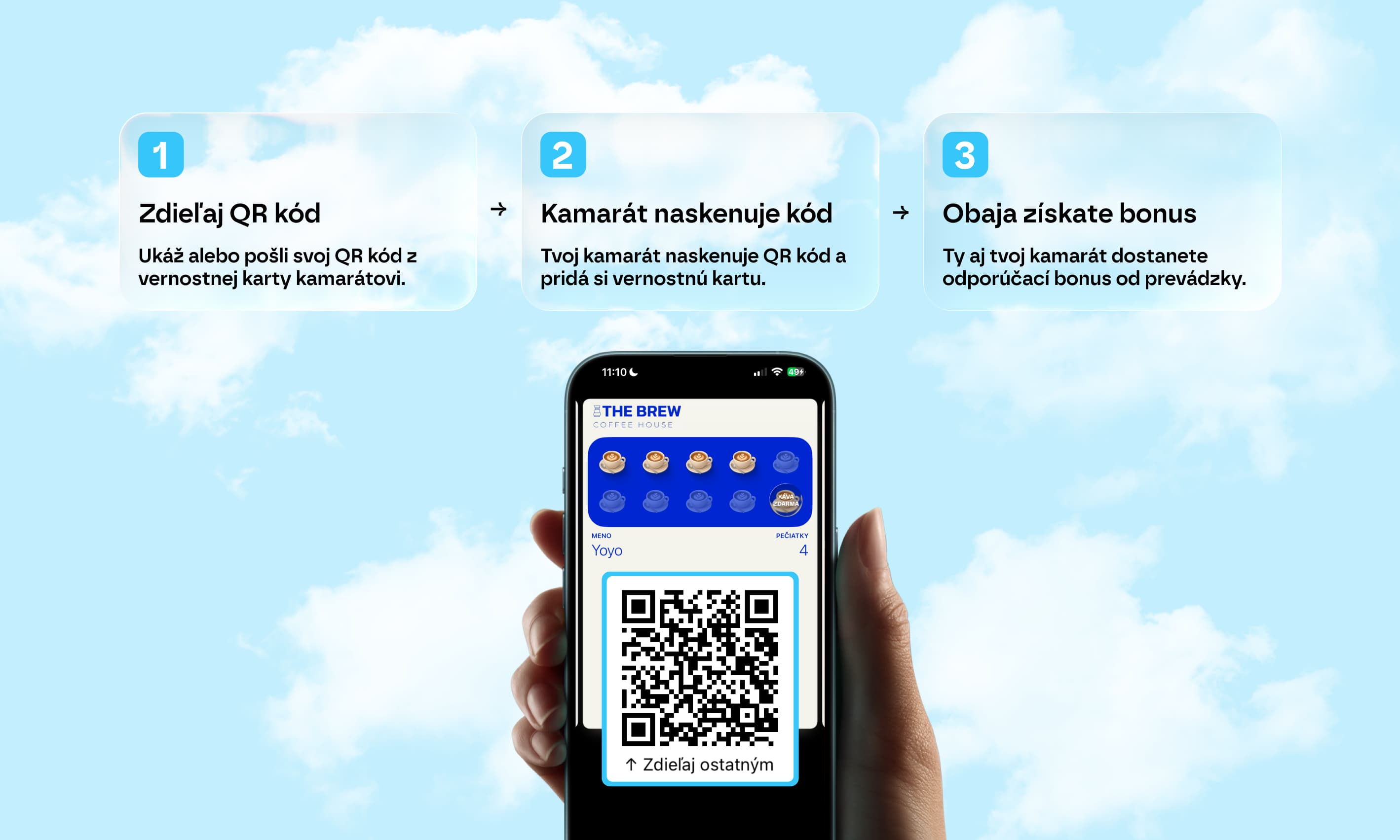
Referral program. Your customers can now invite friends via a personal QR code on their card. When the invited friend makes their first purchase, both automatically receive a reward.
Customer lookup by name or phone. In addition to scanning a QR code, staff can now find a customer by entering their name, email, or phone number directly on the register.
Key takeaway
Fourth card type: gift card in both digital and physical formats
Multi-Cloud: points accumulate across all venues
Referral program: customers invite friends, rewards are distributed automatically
How the Integration Works at the Register
The whole process is designed so staff have nothing extra to do. If you know how to use Dotykačka, you can handle the VEXiON integration.
Step by Step: What Happens With Every Purchase
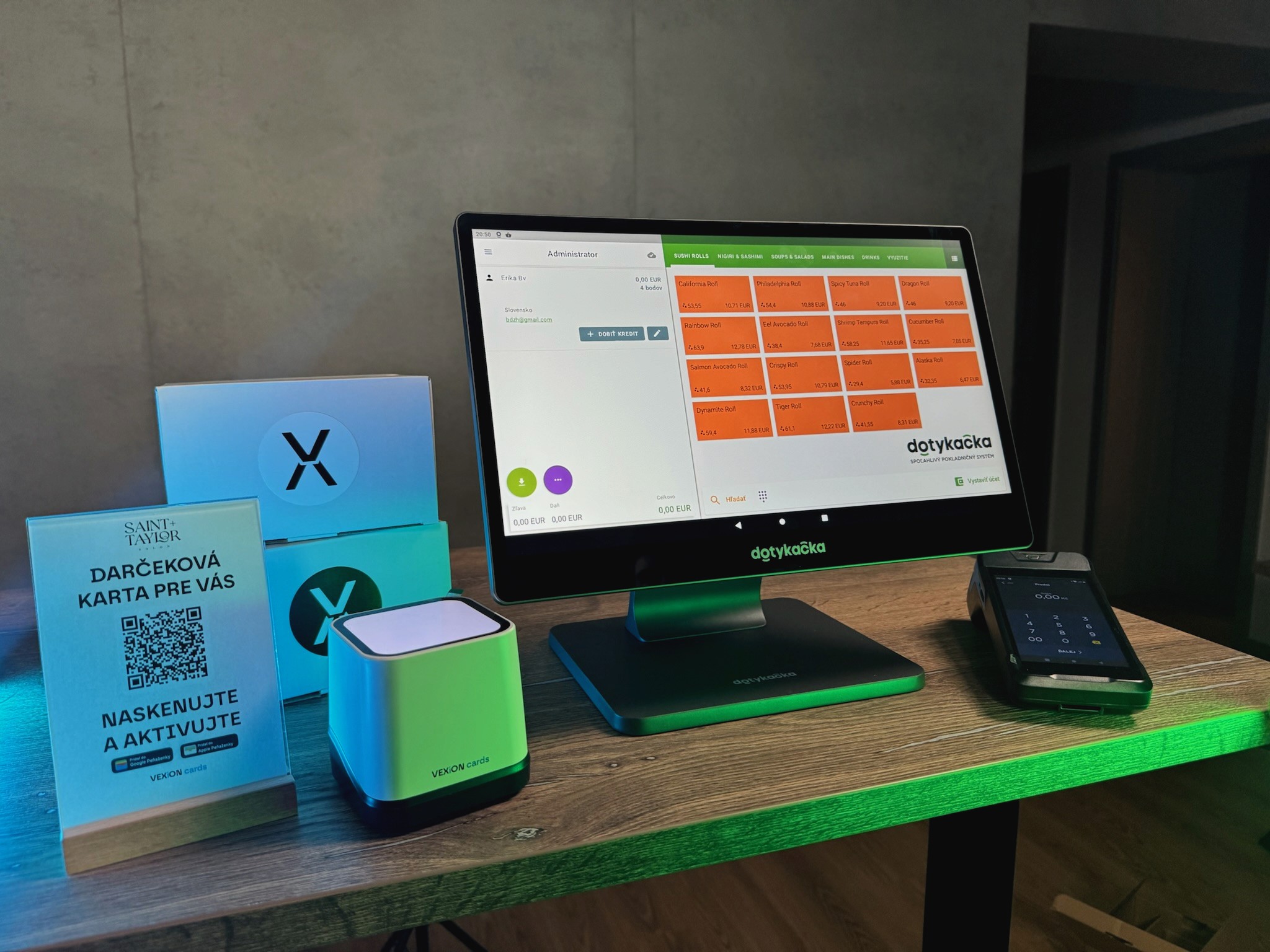
Step 1: A customer arrives at the register. They open Apple Wallet or Google Wallet on their phone and show the QR code from their loyalty card.
Step 2: Staff scan the QR code using a USB or Bluetooth scanner connected to Dotykačka. Alternatively, the customer can be found manually by name, phone, or email using the "Select Customer" button in the order header.
Step 3: The Dotykačka screen immediately shows the customer's name along with their current point balance, stamp count, or discount tier.
Step 4: Staff add products as usual. Each product has a configured point value and staff can see this directly on the product tile (e.g., "Espresso +1" or "Cappuccino +3").
Step 5: If the customer wants to redeem a reward or use points, staff add the appropriate product before payment.
Step 6: The customer pays. Dotykačka sends the order information to VEXiON.
Step 7: VEXiON processes the points and automatically updates the card in the customer's wallet. The customer sees the new balance on their card within seconds.
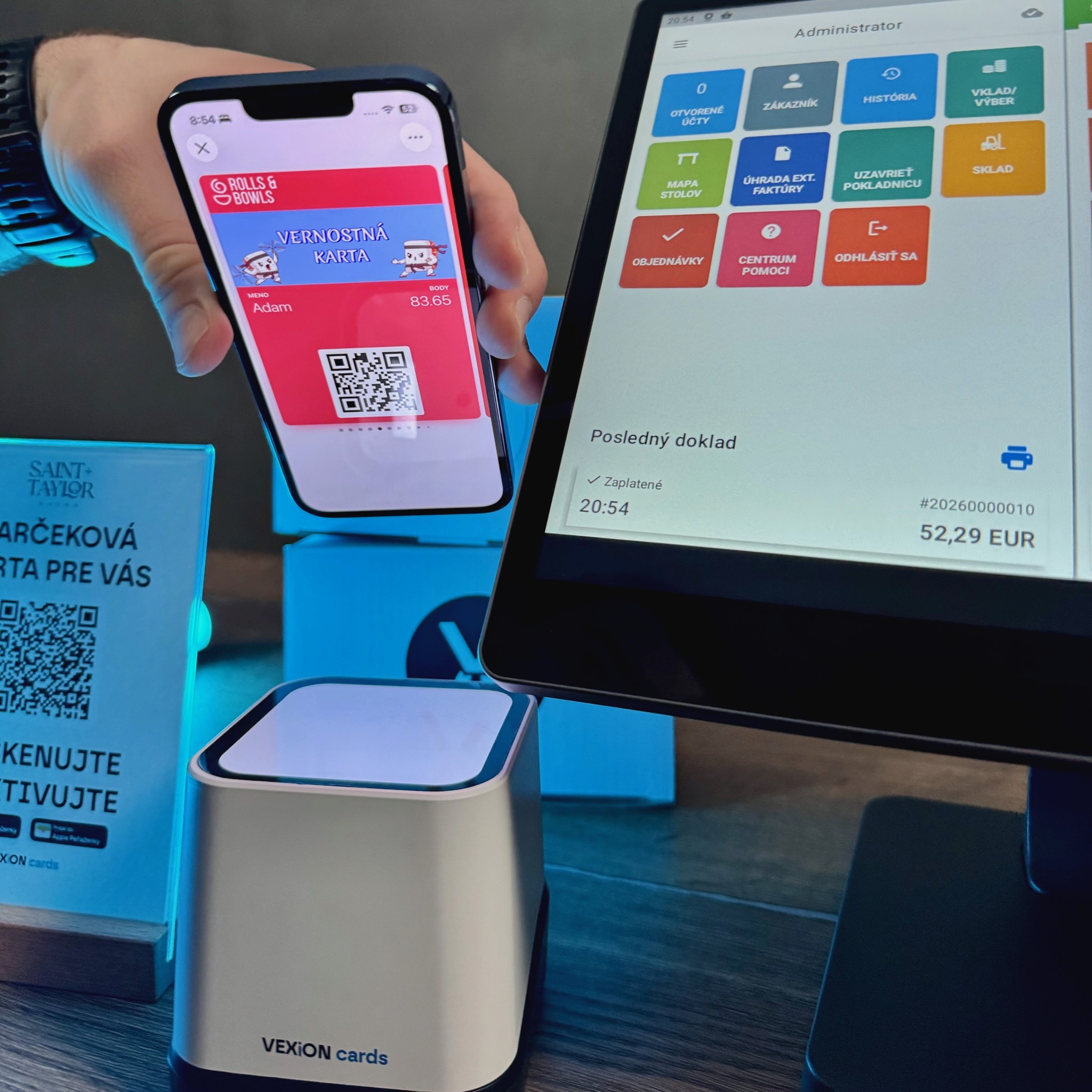
The entire process from scanning to customer assignment takes a few seconds
Important: The customer must be assigned to the order before completing payment. Without an assigned customer, no points will be recorded.
Key takeaway
Staff only scan the customer and ring up products, everything else is automatic
Points and rewards are configured directly on products in Dotykačka
The card in the customer's phone updates immediately after payment
Four Types of Loyalty Cards
With the Dotykačka integration, you can use four different loyalty card types. Each works differently and fits a different business model.
1. Stamp Card – The Classic That Works
Customers collect stamps and once they reach a set number, they get a free product. The classic "10th coffee free" setup.
How it works in practice:
In VEXiON, you set up the card with the required number of stamps for a reward (e.g., 10). In Dotykačka, you assign bonus points to each product. Then you create a reward product, e.g., "Cappuccino FREE" with a price of €0 and points set to -10. The negative number means stamps are deducted when the reward is applied.
Product | Points | Price |
|---|---|---|
Espresso | +1 | €2.50 |
Cappuccino | +1 | €3.00 |
Latte | +1 | €3.50 |
Cappuccino FREE (reward) | -10 | €0 |
Tip: The negative points on the reward product must match the stamp count set on the VEXiON card. A 10-stamp card means the reward product should have -10 points.
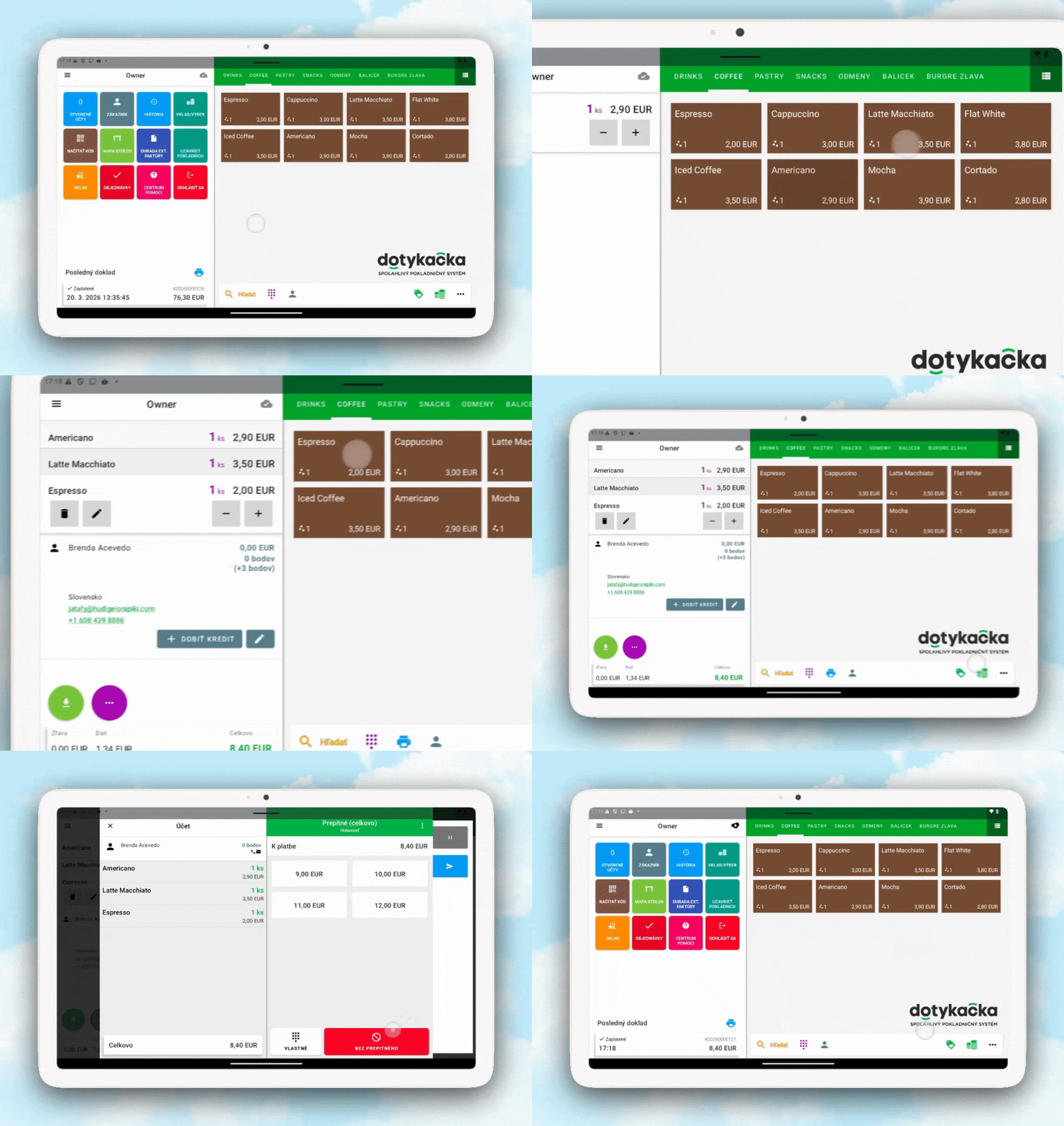
Customer collects stamps automatically and gets a reward when they reach the count
Stamp card as a prepaid card
The stamp card can also be used as a prepaid bundle. A customer buys, say, 10 coffees upfront and receives all stamps immediately on their card. They then redeem them one by one on each subsequent visit. This model works great for regular clients who want to pay in advance and benefit from it. Read more in the article Prepaid cards for your venue.
Ideal for: Cafés, bakeries, ice cream shops, fast food
2. Points Card (Credit Cashback) – Points Convert to Euros
Customers collect points with every purchase. Points then convert to a euro discount and customers choose when and how many points to use.
How it works:
In Dotykačka, you create a special "Points Usage" product and set the price per point. We recommend €0.01, which keeps the math simple: 100 points = €1. You then assign bonus points to each product based on what cashback percentage you want to offer. Points on products can be set quickly using bulk editing directly in Dotykačka.
Redeeming points at the register:
Staff open the "Rewards" category and add "Points Usage"
Enter how many points the customer wants to use
The system automatically calculates the euro discount
The discount is deducted from the total
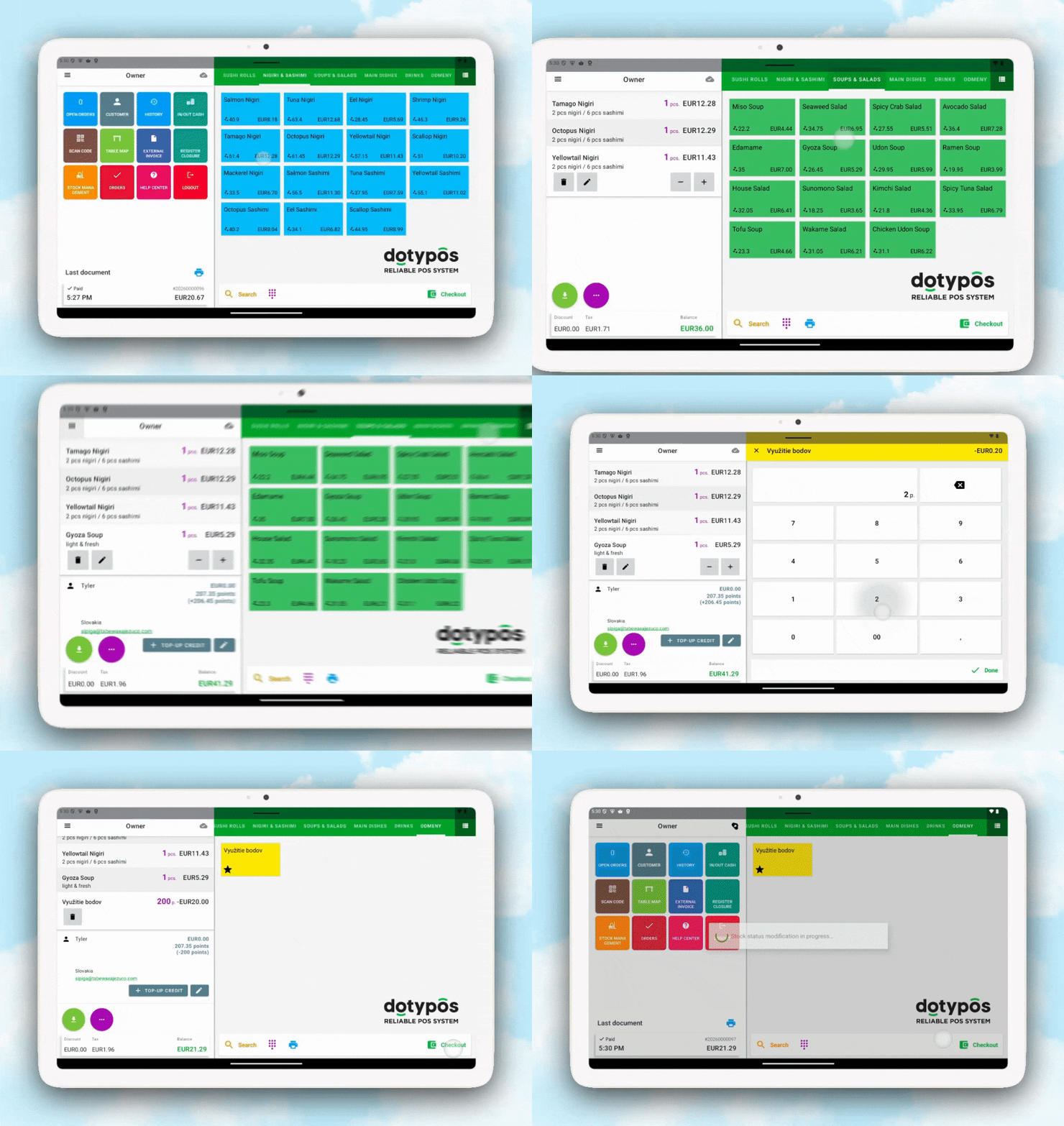
Customer chooses how many points to use
Ideal for: Restaurants, retail, wellness, services
3. Discount Card – Automatic Percentage Discount
Customers receive an automatic discount based on their tier. The more they spend in total, the higher their discount on future visits. But the discount card doesn't have to be a multi-tier loyalty program. It also works very well as a single-tier card for specific groups of people.
Multi-tier program (based on total spend):
Tier | Minimum Spend | Discount |
|---|---|---|
Bronze | €0 | 5% |
Silver | €500 | 10% |
Gold | €1,500 | 15% |
Single-tier program (for selected groups):
Group | Discount | Who Gets It |
|---|---|---|
Employees | 30% | Your team |
Friends & Family | 15% | Selected people |
VIP customers | 20% | Long-term regulars |
A single-tier card is ideal when you want to give a discount only to specific people and you decide who gets access. Combined with the referral program, you can also control who can invite further members.
How the setup works:
You set tiers and discount percentages in the VEXiON card settings. VEXiON automatically creates discount groups in Dotykačka named e.g. VEXiON: Loyalty Card - Gold 15%. When a customer reaches the required spend threshold, they automatically move to the next tier without any manual action. At the register, the discount applies automatically as soon as the customer is assigned to the order.
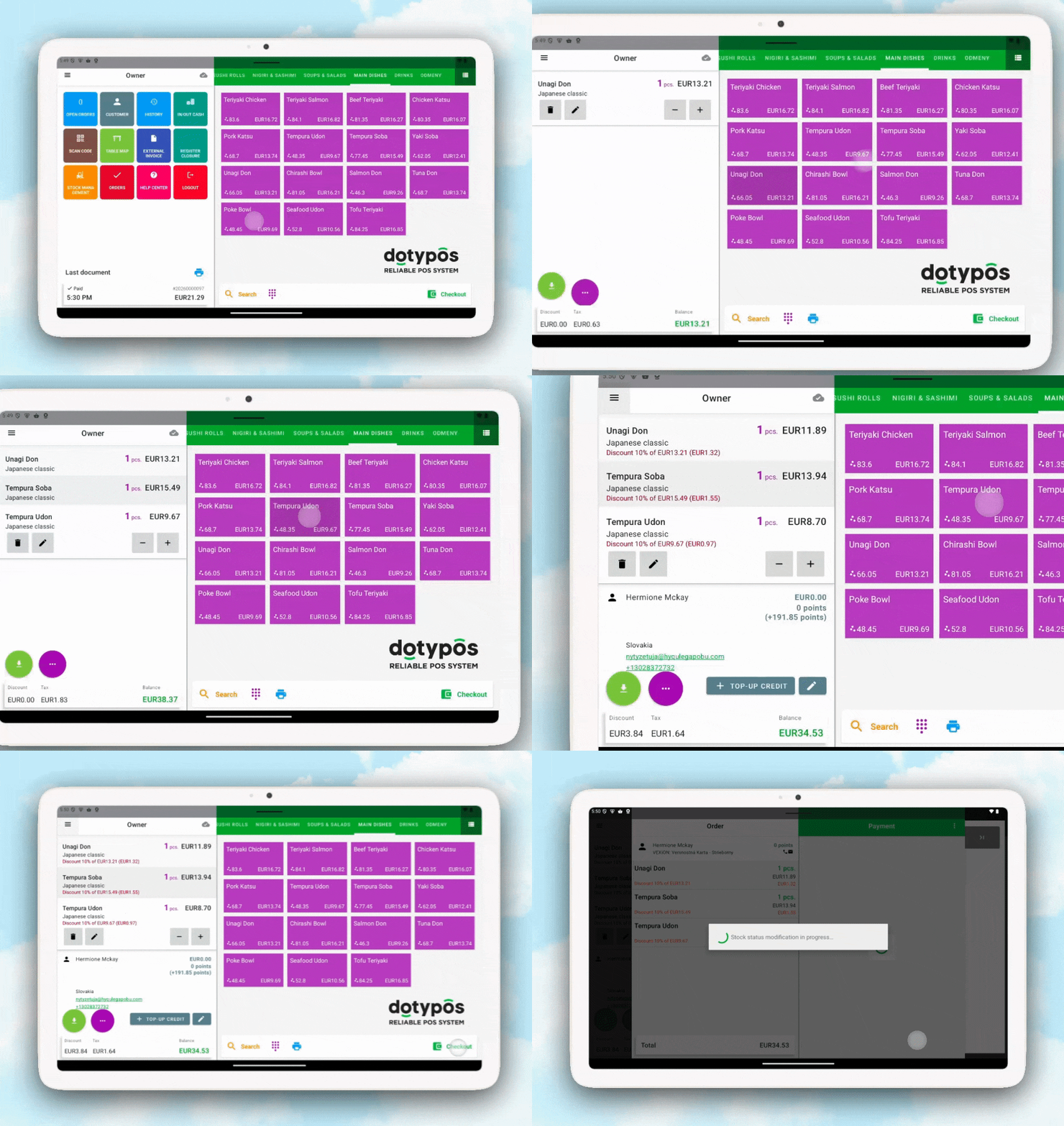
Discount applies automatically without any staff action
Ideal for: Restaurants with regular guests, shops, hair salons, service businesses, employee programs
4. Gift Card – A New Revenue Stream
A gift card is prepaid credit. Someone buys it as a gift for another person and the recipient pays with it directly at the register. It works through Dotykačka's built-in customer credit system.
Digital gift card:
The buyer scans a registration QR code in the venue and fills in a form on their phone (their name and the recipient's contact)
A temporary QR code appears, which they show to staff
Staff scan the temporary code, load the credit, and the buyer pays
The buyer receives a confirmation with a PDF and the recipient gets their card via SMS or the QR from the PDF
Physical gift card:
For venues that want to offer customers a classic physical card, we support this format too. Physical cards have pre-generated QR codes printed directly on them and remain inactive until the moment of purchase. Here's how the process works:
A customer picks up a physical gift card in the venue
Staff scan the QR code from the physical card at the register
They enter the amount the customer wants to load
The customer pays and the QR code is activated
The recipient shows the physical card when paying; staff scan the QR code and the payment is processed from the credit
The physical card is only activated at the moment of payment, so it's completely safe before the sale. If the customer wants to top it up later, staff simply scan the QR code again at the register.
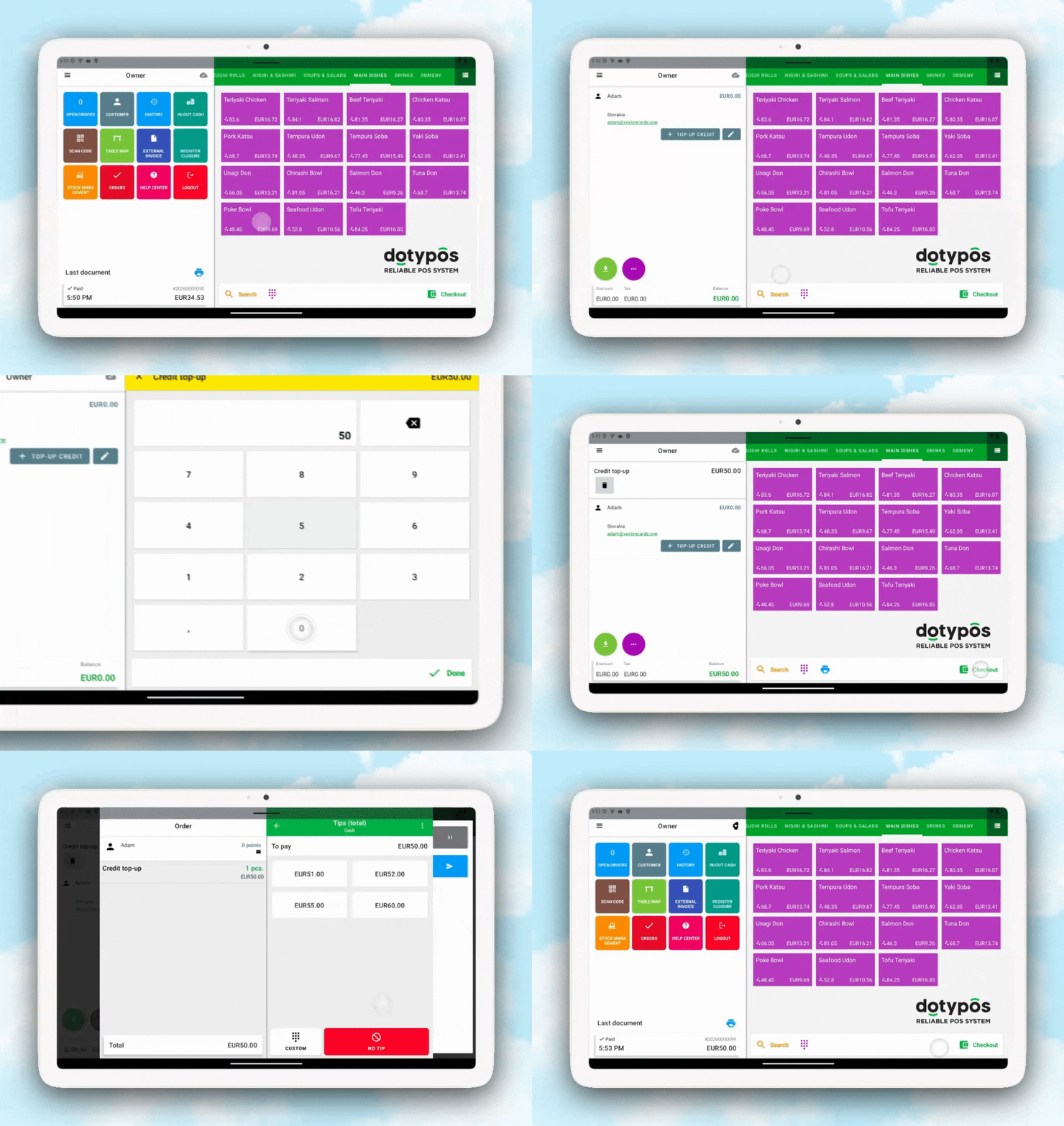
Gift card activates at the point of sale and the recipient pays directly from credit
Bonus program: You can configure a bonus percentage. With a 10% bonus, a customer pays €100 and the card loads €110. This encourages higher top-up amounts.
Paying with a gift card: The recipient shows their QR code (from their phone or from the physical card), staff scan it, and at payment select "Customer Credit." The amount is automatically deducted from the credit. If the credit doesn't cover the full bill, the customer can pay the difference in cash or by card.
More information about gift cards is available in the article Digital Gift Cards 2026.
Ideal for: All business types, holidays, birthdays, corporate gifts
Key takeaway
Stamp card: collect stamps, redeem for a free product or buy a prepaid bundle
Credit Cashback: points = euros, customers choose when to use them
Discount card: automatic percentage discount, works as single-tier for employees or F&F
Gift card: prepaid credit in digital and physical format, optional bonus program
Referral Program: Customers Invite Friends
Every one of your customers can now share their loyalty card with friends via a personal referral QR code found directly on the back of their card in Apple Wallet or Google Wallet.
How it works:
A friend scans the QR code, registers, and on their first purchase both automatically receive a reward. No staff action needed. In your VEXiON settings, you simply set the reward amount for the referring customer and for the new customer.
Setup examples:
Setup | Referring Customer | New Customer |
|---|---|---|
Two-sided program | +2 stamps | +1 stamp |
Referrer only | +5 points | nothing |
Welcome bonus only | nothing | +3 stamps |
The referral program works with stamp, points, and discount cards. Gift and membership cards are not supported.
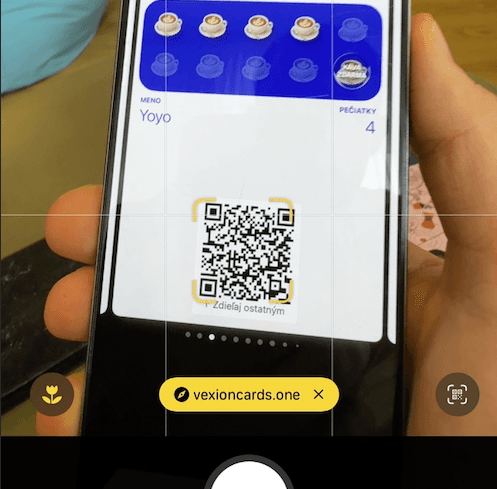
Customers find their referral QR code right on their card in their wallet
Read more about how to set up and make the most of the referral program in the article Referral program for your customers.
Key takeaway
Customers share their card via the QR code on the back
Rewards are added automatically after the invited friend's first purchase
You set the reward amount for both sides
Multi-Cloud: One Loyalty Program Across All Your Venues
If you own multiple venues where each has its own Dotykačka cloud with its own products and prices, Multi-Cloud lets you connect all of them under one VEXiON account.
When Do You Need Multi-Cloud?
Use Multi-Cloud if:
You have, for example, a bistro and a café, each with a different menu and different prices
Each venue operates as a separate cloud in Dotykačka
You want customers to collect points across all venues into one card
You don't need Multi-Cloud if:
You have multiple registers in one venue, that's still one cloud
All your branches share the same menu and prices in Dotykačka
If you're not sure how many clouds you have, log into the Dotykačka Remote Management. You'll see either one cloud name or a list of clouds in the top menu.
Note: VEXiON Multi-Cloud is a separate feature for linking multiple Dotykačka clouds to one VEXiON account.
Points Setup Per Cloud
Points must be configured separately in each cloud via Dotykačka Remote Management. Loyalty rules (card type, discount tiers) apply the same way across all clouds. You can't have stamps in one cloud and cashback in another.
Key takeaway
Customers accumulate points at every venue into one card
Available for Dotykačka accounts with integration support
Loyalty rules apply the same way across all venues
Setting Up the Integration Step by Step
The full setup takes about 15 minutes. No technical expertise needed.
What You Need Before You Start
Active Dotykačka account with a license that supports integrations
Access to Dotykačka Remote Management (admin.dotykacka.cz)
Active VEXiON cards account (app.vexion.one)
At least one loyalty card created in VEXiON
Step 1: Connect to Dotykačka
Log in to VEXiON admin (app.vexion.one)
Go to Settings → Integrations → Dotykačka
Click "Connect to Dotykačka"
A new Dotykačka login window opens
Enter your Dotykačka credentials, select your cloud, and click "Allow"
Close the window. The integration is connected.
Step 2: Configure Card Types in VEXiON
In the integration settings, enable only the card types you actually use:
Setting | Default | Description |
|---|---|---|
Sync customers | ✅ On | Automatic synchronization |
Discount cards | ✅ On | Discount groups by tier |
Gift cards | ❌ Off | Customer credit |
Stamp / Points cards | ❌ Off | Choose one type |
Important: For stamp and points cards, you choose either stamps or points, not both at the same time. Dotykačka uses one shared field in the system for both.
Step 3: Set Up Points on Products in Dotykačka
This is the most important step. Without configured bonus points, customers won't earn anything. You can set points on individual products in the Dotykačka Remote Management or apply them in bulk using the multi-product edit feature.
Step 4: Create Special Products in Dotykačka
For stamp cards: Create a "Rewards" category and add reward products with a price of €0 and negative points (e.g., -10 for a 10-stamp card).
For points cards (Credit Cashback): Create a special product "Points Usage" and set the price per point to €0.01.
For gift cards: Enable customer credit in Dotykačka via Cloud Settings.
Step 5: Enable Points Display on the Register
In Dotykačka, go to Application Settings → Display Settings → Sales Screen and enable "Show points on tile". Staff will see the point value directly on each product tile.
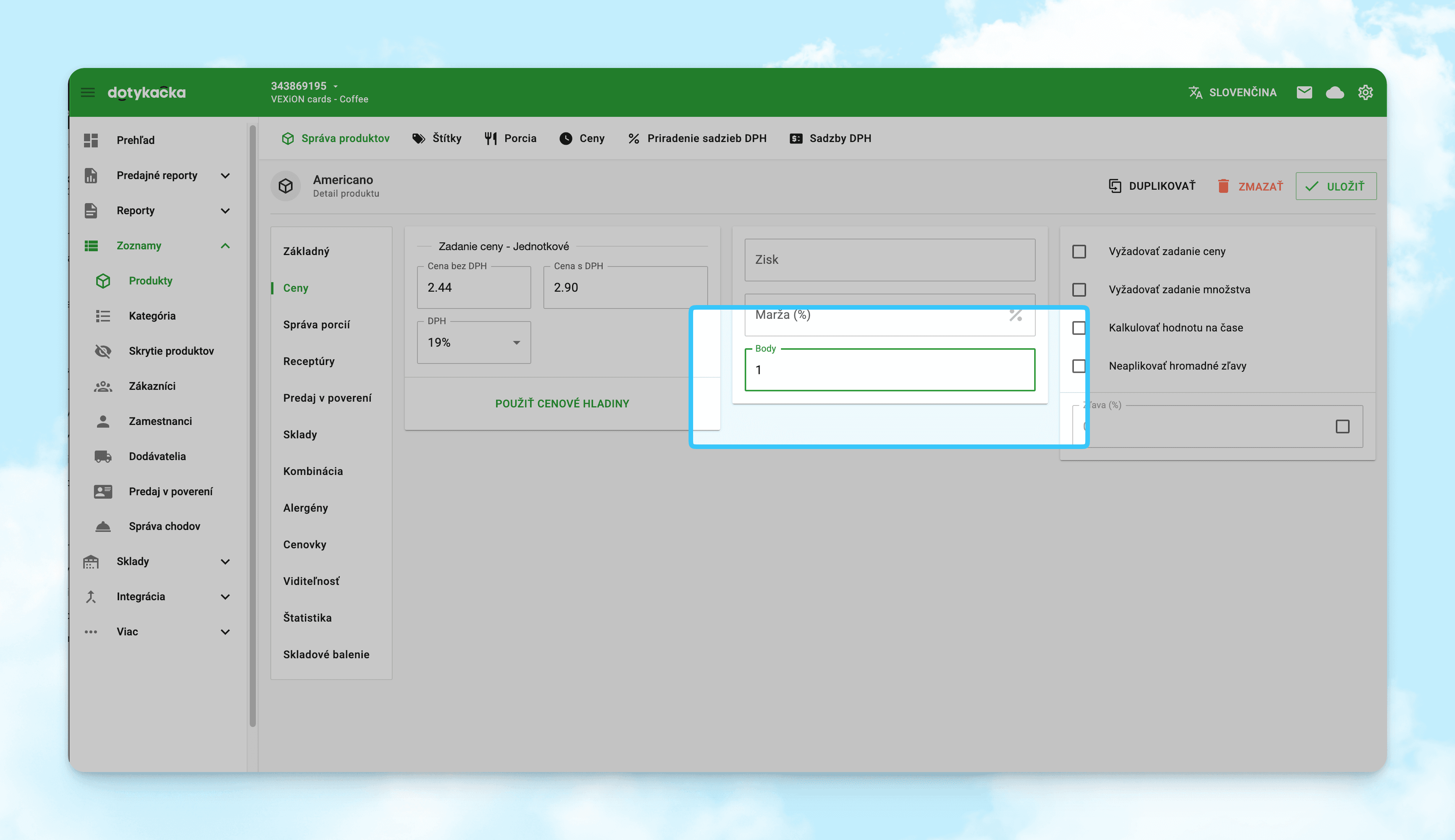
Staff see the point value right on each product tile
Step 6: Connect and Test the Scanner
Connect a USB or Bluetooth scanner to your tablet or register. We recommend VEXiON-supplied scanners (see the startup manual in the box). Test the scanner by scanning the first customer's loyalty card and checking that the customer is correctly assigned to the order.
Key takeaway
Connection via Dotykačka account login, no API keys needed
Points are configured in Dotykačka, not in VEXiON
Full setup in 15 minutes
VEXiON + Dotykačka vs. Paper Stamp Cards
Feature | VEXiON + Dotykačka | Paper Stamp Cards |
|---|---|---|
Processing speed | Automatic, a few seconds | Manual, 10–30 seconds |
Forgotten card | Impossible (always in phone) | A daily problem |
Lost card | Impossible | Lost points, frustrated customers |
Errors | None, system counts precisely | Common missed stamps |
Multiple venues | One program, all locations | Separate cards per venue |
Customer data | Complete visit history | None |
Card costs | €0 | Printing, stock, storage |
Fraud | Impossible | Possible |
Key takeaway
Digital cards eliminate every classic paper card problem
Customers always have their card since it lives in their phone
Accurate data enables targeted marketing decisions
Who Is the Integration Right For?
Cafes and Bakeries
The stamp card "10th coffee free" is a classic that works. Staff have zero extra work. The customer shows their phone and the stamp adds itself automatically. For regulars, you can also offer a prepaid bundle. Sourdough bakery Bloom Bakery with six locations across Bratislava and specialty cafe grão in the city center are great examples of where a loyalty program thrives.
Restaurants and Fast Food
Credit Cashback or a percentage discount for regular guests. Customers collect points with every meal and decide themselves when to use them. Restaurants like Pilsners with two Bratislava locations or Ty Somaru with Mexican street food show that the integration works equally well in classic dining and fast casual.
Retail and Cosmetics
A flexible cashback system motivates customers to return. You can set different point values for individual products. Slovak skincare brand Face Derma is an example of how a loyalty program helps build customer relationships beyond the gastro segment.
Hair Salons, Beauty Studios, Wellness
A discount card rewards loyal clients automatically. Offer your team an employee discount through a single-tier card at 20–30%.
Multiple Venues
Multi-Cloud lets customers collect points at your bistro and your cafe under one card in one wallet. Bloom Bakery, for example, connects six venues under a single loyalty program.
Frequently Asked Questions
What Dotykačka license do I need?
The integration requires a Dotykačka license that supports third-party integrations. If you're not sure, check your license in the Dotykačka admin or contact us and we'll help you verify.
Can I have stamps and points at the same time?
No. Dotykačka uses one field in the system for both. You choose either stamp cards (whole numbers) or cashback points cards (decimal numbers). One clear program is easier for customers to understand anyway.
How long does setup take?
Connecting VEXiON to Dotykačka takes about 5 minutes. Configuring points on products depends on how many products you have, with most venues completing the full setup in 10–15 minutes.
Does the integration work without internet?
Dotykačka works offline. Transactions are stored locally and automatically sent to VEXiON once the connection is restored. Gift cards (customer credit) require a stable internet connection.
What if a customer doesn't have their phone?
Staff can search for the customer manually by name, phone, or email using the "Select Customer" button directly on the register. Points are applied the same way.
Can I disconnect the integration without losing data?
Yes. If you disconnect, customers, points, stamps, and customer credit all remain in Dotykačka. Only the sync with VEXiON stops. To reconnect, you log in again and a new sync begins.
What do customers need to register?
Customers scan a registration QR code displayed in your venue. They fill in their name and email, verify their email address, and the card is automatically added to Apple Wallet or Google Wallet. The whole process takes about 30 seconds.
What is the referral program and do I need to configure anything special?
The referral program lets your customers invite friends via a QR code on their card. You enable the feature in your VEXiON settings and set the reward amounts. Everything else happens automatically. Read more in the article Referral program.
Get Started Today
You can set up the integration yourself in 15 minutes. If you'd like help with the setup or have questions, get in touch:
📧 jakub@vexioncards.one
📱 +421 948 777 490